

Feature
My tabs: practice your own Guitar Pro songs
Exercises make you improve, but it’s often a song that makes you want to play. My tabs lets you import your Guitar Pro files and practice them in the RIFFLEX player, with the same tools as training.
Import your Guitar Pro files
The song you really want to play isn’t in an exercise library. My tabs lets you import your own Guitar Pro files and practice them with the same tools as RIFFLEX exercises.
Your personal library opens from the Shredder plan, with 10 tabs, and 50 on VIP.



Warm-up: the personal library is locked. Shredder: up to 10 tabs. VIP: up to 50.
- Add
- Imports a Guitar Pro file from your computer.
- Counter
- The number of tabs imported against your quota.
- Tab card
- Song title, file size and import date; one click opens the player.
A player built for practice
Your tab opens in the same player as the exercises: score and tab, a metronome with automatic tempo increase, and a panel to manage the file’s tracks.
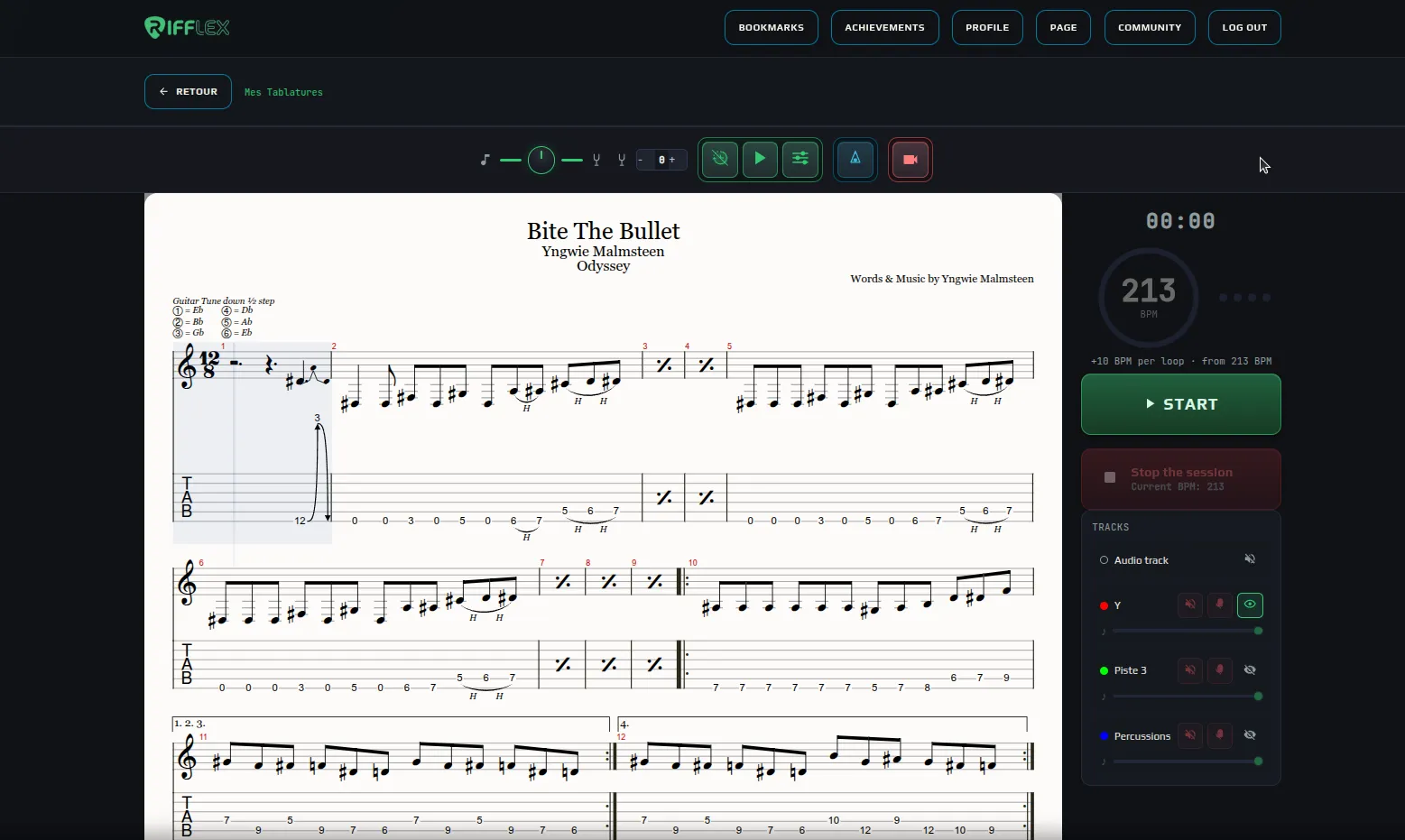
A Guitar Pro file open in the player.
- Score and tab
- Your file shown as is: staff, tab, techniques and repeats.
- Control bar
- Score / metronome balance, transposition, count-in, preview, notation options, metronome and video.
- Metronome and Start
- The start tempo, the automatic increase and the button to start the session.
- Tracks
- Each track of the file, with mute, solo, the eye to show or hide it, and its volume.
The same tools as training
Everything you have on an exercise works on your tabs: automatic tempo increase, notation options, and video to film yourself playing your song with the tab on screen.

The metronome settings: you pick the starting tempo and how it rises, RIFFLEX does the rest.
- Metronome sound
- The click sound: beep, wood, rimshot or pendulum.
- Start BPM
- The starting tempo, with the − and + buttons, the mouse wheel or by turning the knob.
- Increment
- How much the tempo goes up at each step: none, +1, +4, +8 or a custom value.
- Passes before increment
- How many times you play the exercise before the tempo goes up.
- Count-in between loops
- Plays a bar of clicks between two passes, to give you a breather.
- Loop the exercise
- Chains the passes without stopping: the tempo rises on its own.