

Feature
BPM tracker: see your guitar progress in numbers
The feeling of progress is misleading: on a good day everything feels easy, on a bad one everything feels lost. The BPM tracker replaces that impression with an objective record of your tempos, exercise by exercise.
Why track your tempos
The clean tempo you can hold on an exercise is one of the simplest and most honest measures of your technique. Writing it down once doesn’t tell you much; logging it every session reveals a trend.
With a history, you know whether an exercise is moving up, plateauing or slipping. You also know which exercises deserve your time this week, instead of replaying the ones you’ve already mastered.
How it works in RIFFLEX
Every exercise is played with the built-in metronome. The tempo you reach is saved with the session, with no spreadsheet to fill in by hand.
Your progress curves are shown over 30, 90 and 365 days. The short view shows the effect of your week of practice; the long view shows whether your technique is really improving over time.

The metronome settings: you pick the starting tempo and how it rises, RIFFLEX does the rest.
- Metronome sound
- The click sound: beep, wood, rimshot or pendulum.
- Start BPM
- The starting tempo, with the − and + buttons, the mouse wheel or by turning the knob.
- Increment
- How much the tempo goes up at each step: none, +1, +4, +8 or a custom value.
- Passes before increment
- How many times you play the exercise before the tempo goes up.
- Count-in between loops
- Plays a bar of clicks between two passes, to give you a breather.
- Loop the exercise
- Chains the passes without stopping: the tempo rises on its own.
What the curves tell you
- Your strengths: the exercises where your speed climbs steadily.
- Your ceilings: the exercises where the tempo stalls despite the work, often the sign of a specific block worth diagnosing.
- The effect of consistency: progress that lasts shows up on the 90-day curve, not in a single session.
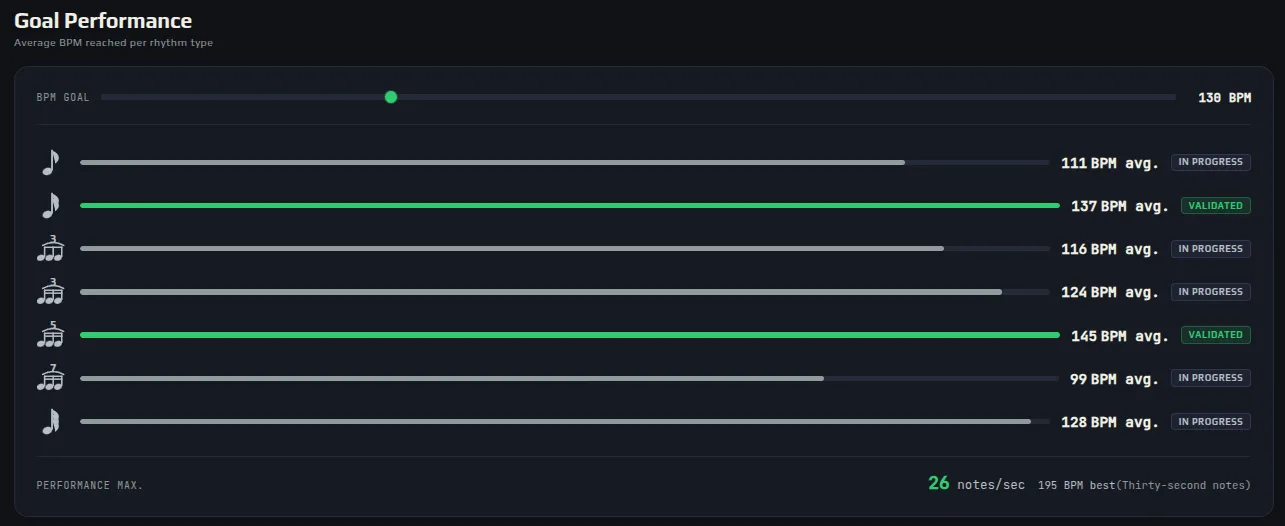
The performance goal: your average tempos per rhythm type, compared with the tempo you’re aiming for.
- Target BPM
- The tempo you’re aiming for, set with the slider.
- One line per rhythm
- Your average BPM in eighths, sixteenths, triplets, quintuplets… against the target.
- In progress / Validated
- A line turns green as soon as your average goes past the target.
- Max performance
- Your record turned into notes per second, to compare different rhythms.